I've been reading about how bad sitting all day long is for your long term health. So I was really interested in the nice Ikea Hacker wide desk, but the cost was still a bit high for my current budget. During a recent trip to Ikea with our next in line for college this fall, I began to formulate a plan for a desk that was better than the cheapest options and not quite as spendy as the aformentioned Ikea option. What I ended up with is the following -
Here's my bill of materials:
1 Vika Amon 150 cm x 75 cm table top - $39.99
4 Vika Kaj adjustable legs - $15.00 each
4 Leg bases made from scrap material - no cost
1 Ekby Jarken 119 cm x 28 cm shelf - $14.99
2 Capita shelf brackets sets (only need 3) - $14.99 each
1 Franklin (29") Chair, on clearance - $24.99
Now in order to make this work I had to adjust the legs a bit higher than the suggested max length. So you'll need to consider whether or not you're comfortable with this for yourself. I'm just under 6' tall and have the table top height set just shy of 1 meter (39" actually) which seems just about right for me and the monitors I have. I also used much bigger washers on the bottom of the Capita brackets to make them more substantial. Also, the wide Ikea standing desk was constructed using a 24" table top and the one I used is 29 1/2", so I used the brackets in the reverse orientation shown on the wide desk to keep the shelf closer to my standing position. And I used large (1 1/2" - 2" diameter) washers on the bottom of the Capita brackets to beef up the mounting a bit.
I used the desk a bit this past weekend and I really like it. Can't wait to lug it into the office in the morning and start using it daily.
Obviously there are lot of definitions of what Java is or isn't and my opinion on the matter isn't very important to anyone at either Oracle or Google, but I was poking around at some things in an Android application at work looking for something. I ended up getting the system properties from System.getProperties() and present the following comparison:
System Properties from Sun Java 6 JVM on my Ubuntu laptop -
file.encoding.pkg: sun.io file.encoding: UTF-8 file.separator: / java.class.path: /usr/share/groovy/lib/groovy-1.7.2.jar java.class.version: 50.0 java.endorsed.dirs: /usr/lib/jvm/java-6-sun-1.6.0.22/jre/lib/endorsed java.ext.dirs: /usr/lib/jvm/java-6-sun-1.6.0.22/jre/lib/ext:/usr/java/packages/lib/ext java.home: /usr/lib/jvm/java-6-sun-1.6.0.22/jre java.io.tmpdir: /tmp java.library.path: /usr/lib/jvm/java-6-sun-1.6.0.22/jre/lib/amd64/server:/usr/lib /jvm/java-6-sun-1.6.0.22/jre/lib/amd64:/usr/lib/jvm/java-6-sun-1.6.0.22/jre/.. /lib/amd64:/usr/java/packages/lib/amd64:/usr/lib64:/lib64:/lib:/usr/lib java.runtime.name: Java(TM) SE Runtime Environment java.runtime.version: 1.6.0_22-b04 java.specification.name: Java Platform API Specification java.specification.vendor: Sun Microsystems Inc. java.specification.version: 1.6 java.vendor: Sun Microsystems Inc. java.vendor.url.bug: http://java.sun.com/cgi-bin/bugreport.cgi java.vendor.url: http://java.sun.com/ java.version: 1.6.0_22 java.vm.info: mixed mode java.vm.name: Java HotSpot(TM) 64-Bit Server VM java.vm.specification.name: Java Virtual Machine Specification java.vm.specification.vendor: Sun Microsystems Inc. java.vm.specification.version: 1.0 java.vm.vendor: Sun Microsystems Inc. java.vm.version: 17.1-b03 line.separator: os.arch: amd64 os.name: Linux os.version: 2.6.35-25-generic path.separator: : program.name: groovysh script.name: /usr/bin/groovysh sun.arch.data.model: 64 sun.boot.class.path: /usr/lib/jvm/java-6-sun-1.6.0.22/jre/lib/resources.jar:/usr/lib/jvm/java-6-sun-1.6.0.22/jre/lib/rt.jar:/usr/lib/jvm/java-6-sun-1.6.0.22/jre/lib/sunrsasign.jar:/usr/lib/jvm/java-6-sun-1.6.0.22/jre/lib/jsse.jar:/usr/lib/jvm/java-6-sun-1.6.0.22/jre/lib/jce.jar:/usr/lib/jvm/java-6-sun-1.6.0.22/jre/lib/charsets.jar:/usr/lib/jvm/java-6-sun-1.6.0.22/jre/classes sun.boot.library.path: /usr/lib/jvm/java-6-sun-1.6.0.22/jre/lib/amd64 sun.cpu.endian: little sun.cpu.isalist: sun.desktop: gnome sun.io.unicode.encoding: UnicodeLittle sun.java.launcher: SUN_STANDARD sun.jnu.encoding: UTF-8 sun.management.compiler: HotSpot 64-Bit Server Compiler sun.os.patch.level: unknown tools.jar: /usr/lib/jvm/java-6-sun/lib/tools.jar user.country: US user.dir: /media/extra/source/sdg-android/zxing-base user.home: /home/kslater user.language: en user.name: kslater user.timezone:
Hmm. Looks like a lot of the same stuff in properties. This really means nothing other than Google wanted to make the system environment as compatible as possible for prospective developers I guess, but it's just curious to me that while it's not Java, it sure looks like Java does from this one perspective..
I took the carburetor off and used a gasket set to replace all the old gaskets. I also cleaned it out well and blew out the jets. Everything looked great. While I had the carb out I decided to drain the tank and clean out the sediment trap and tank screen. I fixed the routing of the cables and the fuel line too. Everything seemed to be looking up. I put it all back together and it leaked like a sieve. I think it leaked fuel faster than it used to come out of the tank.
So I learned that if you're going to clean and rebuild a carb, spend the extra $5 and get the kit with the float, pin and needle valve. Now I have to order parts and wait for the them to come in before I can work on the running parts.
I did spent a bit of time adding some electrical bits. I started it up, even with all the leakage, and what do you know, I have working running lights. That means the voltage output and regulator work, which is another positive.
I also took some time and pounded out some dents. I find it's cathartic to do that sort of work. A dolly and pick and big honking ballpeen hammer that was from my wife's aunt's house. It's old and crusty like a lot of the Vespa. But it's a great tool for doing metal work because it moves the metal around so easily.
So I'll order some parts and work on other bits until I can staunch the flow of gasoline. That stuff's much better going down the throat of the carb..
Well I got the Vespa running. I got some advice and after verifying that I had spark, I began work on the fuel delivery system. Once I was sure that the fuel delivery valve was allowing fuel to flow to the carburetor, I moved on to removing it and giving it a good cleaning. Then I reassembled everything to the point of having a running motor (less the shrouds and other bits). I drifted it down the driveway a couple of times before I realized that I had knocked the ground off on the electronic ignition. Once I reconnected that, a couple more drifts down the driveway and it came to life! Woohoo! Lots of smoke so I still have something to solve with fuel mixture, but it runs. And that's a huge relief. Now I can move on to stripping things down to get the body work sort out. And I can begin to buy some of the replacement parts needed.
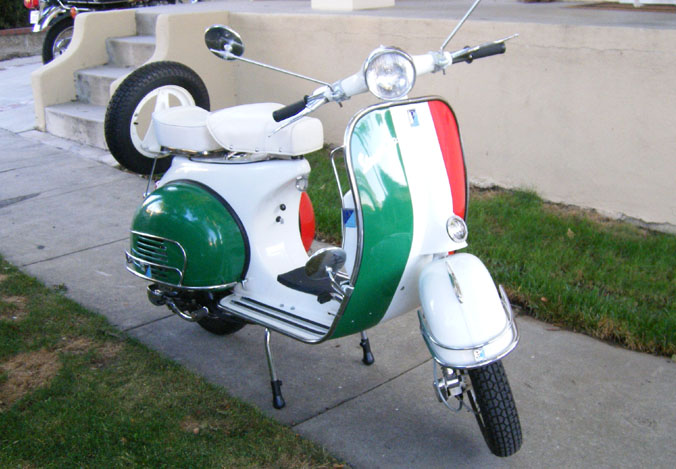
I took it in a trade to get rid of an old car that I had lost the will to work on. Turns out the guy that took it had a rusty truck (been there, don't want to return) or a rat-rod Vespa. It's pretty ratty. But I'm going to try to bring it back to Vespa glory. My goal is to end up with something along these lines -
Obviously, I have a long way to go to get there. First thing is to get the engine running and I'm working on that task at the moment. Then I'll strip it down and begin the work of getting the body work stripped, smoothed and repainted.
Moved up to CM 4.2.8 after I kept hearing how it's, wait for it, once again faster. It's really hard to believe that Cyanogen and the other guys working on this stuff can somehow continually squeeze more performance out of the OS / Hardware. This firmware is singlehandedly keeping me from being jealous of new Android offerings. I've yet to find one with a keyboard that I like as much as my trusty old (old?! it's only been out for a little more than a year) G1 keyboard. Yeah, it's sort of thick, and it has a Jay Leno-wannabe chin, but the CM software is tunable and I can get all day battery life with moderate use.
As long as Cyanogen and the guys keep improving the OS, I can't see a reason why I need a different phone.
Well I've updated my phone a couple of more times since the last blog post and for the most part it just keeps getting better. I went from 4.2.3.1 to 4.2.4, then to 4.2.5 and finally 4.2.6. Each release fixed a few bugs and maybe caused a few more with the exception of the 4.2.6 release. This one is a keeper in my book.
Out of the box, compcache is disabled. You can enable it with using a setting in the Spare Parts app (installed by default with any recent CM release). I tried it with no swap and no compcache for a while. Wasn't satisfied with the response of the phone once you go into and out of a few apps though. (Did I mention that I view my G1 as much as a pocket computer as I do a phone now? No? Oh well.) So I enabled compcache and it was better. Still over time as I navigated places and ran too many browser windows, etc., the available memory gets too low and the poor little G1 processor has to work hard and the garbage collector gets way too busy and things would get a little to laggy for my tastes.
So I made the decision to crack open the Class 6 8g card that I scooped off NewEgg as an anniversary gift and formatted the partitions to mostly match my old Class 2 8g card that I've been using for a number of months. The only difference is that I formatted the 2nd partition as ext4 rather than ext3 this time. (More on why in a future post I hope.) I also resurrected my old /system/sd/user.conf and /system/sd/userinit.sh files to enable swapping to a 70M partition on the sd card. I know that this will wear out the card prematurely, but it's a risk / compromise I'm willing to take. Since enabling the swap the phone is working much better. Doesn't slow down, battery life is great, and I don't really have to go into ATK to kill off unused apps. I'm still trying to be somewhat judicious with what I'm willing to leave running, but I really like the way the phone is performing now.
I can't imagine it getting much better than it is now, so Cyanogen's going to really have to create a compelling release to get me to update any time soon. As always, write call, twitter, whatever if you need to supply missing details.
I've been patiently waiting for Cyanogen to resolve the issues that caused Google to send him a cease and desist letter concerning his previous releases of his customized Android builds (ROMs to some - I think it's a misnomer). Well he worked out the issues - basically, they were unhappy with him packaging their closed source applications with his builds; even though their own build process includes the binaries! - and he was able to get rolling again. Prior to my recent upgrade, I was running CM 4.0.4 which was the last stable build prior to the C&D from Google. That version was very stable and I was pretty happy with it on my phone, but it had one nagging issue and that was that the phone would slowly degrade in performance the longer it had been running. (Android is a customized Linux with a Java like application layer on top, so you literally boot Linux when you power up the phone.)
So I watched intently as Cyanogen got rolling with a new unstable series of builds that didn't infringe on Google's intellectual property. (See they're not all sweetness and light and openess as some might believe.) The numbering of these builds was 4.1.x; numbered similarly to the Linux kernel with even minor version numbers indicate unstable and even indicating stable. The reports from people in the IRC channel (#cyanogenmod on irc.freenode.net) were that the speed of these builds was incredible. Cyanogen put in a different process scheduler than what stock Android is / was using. But it wasn't without issues. Stability was one, and another was randomly starting playing MP3 files. There were other things too and it was just enough to keep me from pulling the trigger and updating.
But at some point you have to release and the guys that help Cyanogen got things to a point that they considered stable and called version 4.2, then 4.2.1, then 4.2.3 and finally 4.2.3.1. And this is the build that I've been running since last weekend. I actually upgraded from 4.0.4 to 4.2.3 with the instructions on the xda-developers thread about the new release. (Have I mentioned how much I dislike xda-developers.com and all thread-based forum sites?) This process basically uses the fact that your phone is already rooted (since I had 4.0.4 already) to perform the update. In summary the process is that you lay down a new official Android 1.6 (Donut) build on your phone using the rooted recovery partition / image and then before completing the installation (by rebooting your phone), you then lay Cyanogen's new stuff over the top of the install thus replacing all the bits required to keep your phone rooted. If done correctly, you end up with a 1.6 rooted build. If done incorrectly, you lose root access to your phone, possibly permanently.
With that dire warning out of the way, what's good about the new version?
It keeps the lovely and indespensible apps2sd functionality (especially if you have a G1). It gives you the latest Android (source released) base OS. It features a tweaked CFS scheduler that positively is better than stock Android. It makes the phone respond like you always hoped it would from the start. My phone responded pretty well with 4.0.4 just after a boot and maybe for a day, but it never ran this well. 4.2.3.1 also has usb tethering. So your phone becomes your laptop's data link when you're out of normal network coverage or just don't want to use whatever WiFi is around you. I haven't recalibrated my phone's battery yet, but I've noticed that day by day, my battery life is improving. I used to be pushing it if I used my phone much throughout the day and would need to juice it up when I got home from work (or sometimes before). Today I noticed that at 5:30pm it was still at 48% capacity. That's a solid 11 hours with plenty of reserve. Word is that if I recalibrate it will get even better. (In other words the phone isn't showing the true capacity of the battery.)
What's bad, if anything?
By default, 4.2.3.1 doesn't use compcache or a swap file or a swap partition. But like all of CM's releases it can use that stuff if you want. To enable it you create a user.conf and userinit.sh in proper place and those 2 files control those and other settings. I enabled a 70M swap partition on my old, slow (unclassified == Class 2) 8g micro SD card. Since enabling swap, I've had occasional spurious reboots of the phone. I think these are related to a timing issue with the wifi radio and the swapping activity to/from the (sd card's) swap partition. I'm seriously considering upgrading to a Class 6 8g card to see if that helps. If it doesn't, I think I'll disable the swap partition. The only downside is that I'll take a penalty when I run all sorts of stuff like I do without some additional virtual memory to back it up.
Someone has updated the Cyanogenmod-updater on the Market and I was able to use it to upgrade from 4.2.3 to 4.2.3.1. Very easy and painless. I'm looking forward to whatever Cyanogen comes up with next. Email or call me if you have questions about the process or whether your phone will work for this update. If I can't get the answer, I can put the question in front of some guys that will know.
I promised a few people a blog entry about rooting my T-Mobile / Android G1. I don't think anyone should enter into a firmware update for any device without considering the risk of brickage. The first thing I did was a fair bit of reading on the process and options. I stumbled upon an article on Lifehacker about why I might want to consider doing this to my extremely useful smartphone. That lead to another article on AndroidAndMe.com about how to actually gain root access to the phone (and more). This got me to the point where I was pretty sure that I wanted to root my phone and install firmware (or a ROM or image) that would improve it's operation but I still had some holes in my understanding of how it would all happen. And since I was risking the phone I've come to depend on daily, I wanted to understand things from end to end.
Still need a bit more info..
It turns out there are quite a few options for new firmware for your Android phone. Some are more suitable for a daily-use phone than others, but that's the beauty of Android being open source. Lots of people grab the source and bend it to scratch whatever itch they have. I kept hearing about one guy's work who goes by the name of Cyanogen on the site xda-developers.com. (Phandroid did an interview with Cyanogen that gives a little more background about him and his work.) xda-developers.com turns out to be a thriving phone modding community with huge threads of discussion specifically about alternate G1 firmware(s). Reading through some of the thread about Cyanogen's latest stable build - 4.0.4 at this writing - helped to fill in more gaps to the point where I finally understood all the steps and software required to get me there. I posted a summary of how I thought it would go and asked for confirmation of my thinking. After an hour or so I got a couple of positive responses and knew I was finally ready to go with Cyanogen's 4.0.4 image.
4G or bigger Micro SDHC card - preferably a Class 6 card
Outline of the steps
Backup, export, copy phone data to some place safe
Backup existing SD card
Create 3 partitions on the SD card in exactly the following order:
Partition 1: format - FAT32, size - whatever is left over after subtracting partitions 2 & 3
Partition 2: format - ext2/3/4, size - 512M (this is where most of your apps will live)
Partition 3: format - linux swap, size - 32M (this is optional)
Copy the stuff above to the FAT32 partition
Install flashrec on the phone
Run flashrec, backup current recovery image and install the 1.4 recovery image
Reboot the phone into the recovery image mode
Backup current T-Mobile cupcake firmware using nandroid
Install 4.0.4 firmware
Reboot (and wait for the first boot since lots of stuff is happening)
Maybe a few videos will help?
Ok, I tried it with my daughter's snapshot camera and Mr. Blurrycam appeared. I'm too tired / have a headache / am being lazy /whatever to try some other device now. No sense having a video of how things work when you can't see the phone screen anyway. So here's a link to a video that someone else did which shows them running flashrec to exploit the vulnerability and install the recovery image. NOTE! In the video below they show the complete process including wiping the existing phone, but they skip the process of backing up the current firmware using the nandroid backup menu item. I don't advise doing this (obviously)!
I'll try to get a video of my phone in action because I think that's what truly helps to make the determination if it's worth the (minor) risk.
Some stuff I learned along the way..
Once the phone is rooted, it does all the things the stock firmware did but more. That means that voicemail, the market, updates, etc. all work just as before. Only now you can run things like Wifi / Bluetooth tethering so that your phone can be a hotspot for your laptop when there aren't any other options. And the browser supports multi-touch. And so on. But you won't be getting any OTA updates from T-Mobile any longer, not that you need them.
The 1 touch root application exploits a known issue in the Android Cupcake (and earlier) bluetooth stack. This allows you to install a different recovery image (there is one included in the stock firmware too) that then allows you to install different, unlocked / rooted firmware. If you run the flashrec program and install the 1.4 recovery image and then just restart the phone without doing anything else, the stock firmware will overwrite the 1.4 recovery image with it's own. This confused me at first - so you could think of the flashrec program as a 1 time root access program. Of course you can just run it again and have another shot at gaining access to a recovery image that will allow you to install what you want. At some point Google / T-Mobile will close this exploit. In fact, the modified firmware that I'm running - 4.0.4 - has already fixed it. But 4.0.4, unlike the stock firmware, doesn't overwrite the recovery image when it starts, so you still have access to whatever recovery image you install to flash 4.0.4 in the first place.
The 4.0.4 firmware has something called App2SD turned on by default and it makes use of the 2nd partition on your SD card if it finds it formatted in any of ext2/3/4. Applications are stored on the card as is the dalvik VM cache. Application data remains on the internal memory of the phone. This was done to lessen the impact of writes to the SD card. It's also why you want to use the fastest SD card you can.
The 4.0.4 firmware uses something called CompCache to create a RAM based swap file for the phone while it's running. This is another reason that the 4.0.4 firmware is more responsive than the native firmware. It might also contribute to lower battery life, but for me, the jury is still out on how well the phone does w.r.t. power consumption. I hear that the 4.1 stuff that Cyanogen is working on (based largely on Android Donut branch) will greatly improve the battery life of the phone. Looking forward to that.
A rooted Android phone is not the same thing as an unlocked phone. If you want your T-Mobile phone unlocked as well you need to contact T-Mobile and ask them to give you the unlock code.
The nandroid backups that the recovery image makes can also be restored by the recovery image. However, the recovery image restore menu item will only restore the latest backup. So if you want to restore something earlier, you need to remove any newer image backups from the nandroid folder on the phone's SD card. The restore is very slick. I managed to forget to export some data from a couple of apps that I've been using since my first days with the phone so I really needed to go back and get it. No worries. First I booted into the recovery console and made a backup of my newly installed 4.0.4 firmware. Then I powered off the phone and put the phone's SD card into my laptop and moved the 4.0.4 backup off the card. Then I booted back into the recovery console and hit restore and after another reboot my phone was back to it's Cupcake original firmware complete with all the apps and their data.
"Some people, when confronted with a problem, think ‘I know, I'll use regular expressions.’ Now they have two problems." -- Jamie Zawinksi
"as the designers of the SAX API demonstrate so vividly, any problem in computer science can be amplified with another level of indirection." --Cay Horstmann
That a soldier knows not only the enumerated powers in the Constitution, but also the limitations of the same from Jefferson specifically related to the general welfare clause.
I shot a few pictures at the Pittsburgh Autism Walk. The purpose is to raise money for autism research. Pittsburgh does a great job and ends up bringing more money that much larger cities. I walked with Team Jordan to support my sister's family (including Jordan) and most of pictures reflect that.
I think this guy is smart. If you ever listen to his show, he'll likely rub you wrong because he comes off as a snarky New Yorker (which he probably is), but he also has a very good understanding of law and government.